
COHOSTING
  • 0 Shopping Cart
  • Home
  • Store
    • Browse All
    • Web Hosting
    • Web Design Packages
    • Reseller Hosting
    • SEO
    • Register a New Domain
    • Transfer Domains to Us
  • Announcements
  • Knowledgebase
  • Network Status
  • Contact Us
  • More
  • Account
    • Login
    • Forgot Password?
  1. Portal Home
  2. Knowledgebase
  3. 7. Domain Management
  4. How to Remove a Subdomain in cPanel?

  Categories

18
1. Email Setup
11
2. Mobile Email Setup
18
3. Web Builder
7
4. Mail Filters & Spam
11
5. Databases
9
6. FTP
10
7. Domain Management
12
8. cPanel - Control Panel
5
9. SSL

  Categories

  Support

  My Support Tickets   Announcements   Knowledgebase   Downloads   Network Status   Open Ticket

How to Remove a Subdomain in cPanel? Print

  • 3

1. Log into your cPanel account.


2. In the Domains section, click on Subdomains Icon.

 

3. Under the Modify a Subdomain list you can see a list of subdomains.

4. Click the Remove option under the Actions tab.
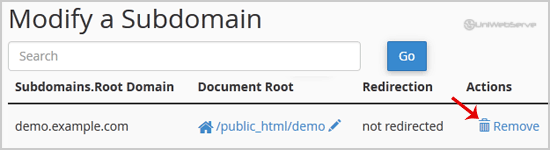

5. You will receive a warning that you are removing a subdomain.example.com. You will need to click on the Delete Subdomain button to remove your subdomain permanently.




Was this answer helpful?

Related Articles

How to Create a Subdomain in cPanel? 1. Log into your cPanel account.2. In the Domains section, click on Subdomains Icon. 3. Under... How to Redirect subdomain to an external URL? 1. Log into your cPanel account.2. In the Domains section, click on Subdomains Icon. 3. Under the... How to Park a Domain in cPanel? Note: Before parking a domain, First you need to update name server of your domain you want to... How to Remove Parked Domain name in cPanel? 1. Log into your cPanel account. 2. In the Domains section, click on Parked Domains Icon. 3.... How to Create Addon Domains? Before adding an Addon Domain name, you need to point your addon domain name server to your main...
« Back

Powered by WHMCompleteSolution

  Support

  My Support Tickets   Announcements   Knowledgebase   Downloads   Network Status   Open Ticket
  • Contact Us

Copyright © 2026 COHOSTING. All Rights Reserved.


Loading...
Loading...

Generate Password

Please enter a number between 8 and 64 for the password length